Top Wing Cadets Coloring Game

Top Wing Cadets Coloring Game

Arcade Hypercasual
Developer: Vivid Pixel Dev
Published: 2025-07-02
Updated: 2026-06-12

Reviews

Top Wing: Color the Cadets offers a straightforward coloring experience that appeals to fans of the show. The interface is clean and intuitive, allowing children to focus on creativity. Multiple pages provide variety, and the save feature lets families keep favorite artworks. The game runs smoothly on different devices and requires no setup. It is a reliable choice for parents seeking screen time that is both entertaining and skill-building. Replay value comes from trying new color combinations and completing all available scenes.

Game Introduction

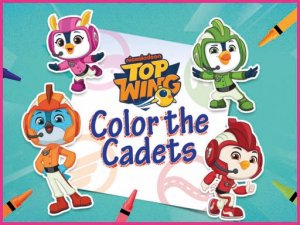
Top Wing: Color the Cadets Online Coloring Game is a free, browser-based coloring activity inspired by the Top Wing animated series. Young fans can bring black-and-white pages to life by coloring four main cadets—Swift, Penny, Brody, and Rod—as they train at Top Wing Academy. The game offers a safe, creative space where children can express themselves artistically. No download or registration is required, making it easy for families to start playing immediately. This game is part of the Nick Jr Games collection and is designed to be accessible on both computers and tablets.

How to Play

To begin, choose a black-and-white coloring page from the available options. Each page features one or more cadets in a scene. Use the color palette at the bottom of the screen to select a color, then apply it with the brush tool for detailed areas or the fill tool to cover larger sections quickly. If you make a mistake, the eraser tool lets you remove color and try again. The controls are simple and intuitive, making it easy for young children to use. Once your artwork is complete, you can save it to your device or share it with family and friends.

Game Features

Features include multiple coloring pages starring Swift, Penny, Brody, and Rod. Simple controls with brush, fill, and eraser tools provide a smooth coloring experience. A wide color palette encourages creative expression. The game requires no download or registration, works on desktop and mobile browsers, and offers a safe, ad-free environment suitable for young children. Finished artwork can be saved or shared easily.

Tips for Success

Start with the fill tool for large areas to save time, then use the brush for smaller details. Experiment with different color combinations to make each cadet unique. If you make a mistake, the eraser tool lets you correct it without starting over. Take your time and enjoy the process—there is no time limit. Sharing your finished artwork with family and friends can be a fun way to celebrate your creativity.

Compatibility

💻 Desktop | 📱 Mobile | 📟 Tablet
– All supported · Best with Chrome or Safari
Faq
Is this game free to play?
Yes, Top Wing: Color the Cadets Online Coloring Game is completely free to play. There are no hidden fees or in-app purchases required to access the coloring pages or tools. You can start coloring immediately without any payment.
Do I need to create an account to play?
No account or registration is needed. You can simply open the game in your browser and start coloring right away. This makes it very convenient for young children and families who want a quick, hassle-free activity.
Can I play this game on a tablet or phone?
Yes, the game is designed to work on both desktop computers and mobile devices such as tablets and smartphones. The controls are touch-friendly, so you can color using your finger or a stylus on a tablet screen.
Is the game safe for young children?
Absolutely. The game is part of the Nick Jr Games collection, which is known for providing safe, child-friendly content. It features no ads, no external links, and no inappropriate material, making it a secure environment for preschoolers and young fans.
Can I save or print my colored pictures?
Yes, once you finish coloring a page, you can save it to your device as an image file. You can also share it with family and friends. Printing is not directly mentioned, but saving the image allows you to print it later if you wish.
What if I make a mistake while coloring?
The game includes an eraser tool that lets you remove color from any area you have painted. You can use it to correct mistakes or start over on a specific part without affecting the rest of your artwork. This makes the game forgiving and encouraging for young artists.
Advertisement

Associated Games