
Reviews
Circus Color Click Art offers a calm and enjoyable coloring experience. The variety of circus-themed outlines, from clowns to tents, keeps the activity fresh. The intuitive click-to-paint system and undo button make it easy for anyone to create vibrant artwork. It is an excellent choice for unwinding after a busy day.
Description
Game Introduction
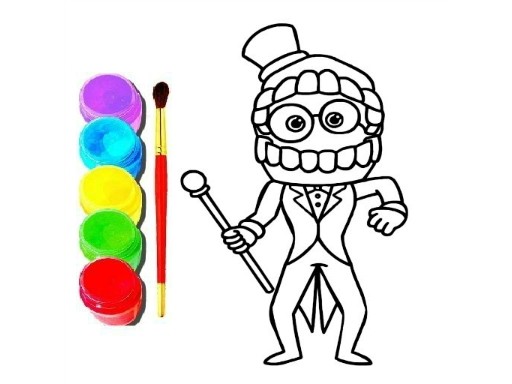
Circus Color Click Art is a relaxing online coloring activity that brings a cheerful circus theme to your screen. The core objective is to fill black-and-white outlines of circus elements, such as clowns, tents, and animals, with vibrant colors using simple clicks. What makes this game unique is its focus on creative expression without any pressure: there are no timers, scores, or rules to follow. It is designed for players of all ages who want to unwind and create colorful artwork at their own pace. The game is entirely online and requires no downloads or registration, making it instantly accessible on computers and tablets.
How to Play
To play, start by selecting a circus-themed picture from the main menu. A palette of colors will appear on the side or bottom of the screen. Choose a color, then click on any area of the picture you wish to fill. The selected color instantly covers that region. You can switch colors at any time and use the undo button if you make a mistake. There are no time limits or rules, so you can work as slowly or quickly as you like. The interface is intuitive and works well with both mouse and touch input, allowing you to complete one picture or try them all.
Game Features
Features include a variety of circus-themed images to color, a simple click-to-paint interface, an undo option for corrections, and a relaxing, no-pressure environment. The game is family-friendly and suitable for all ages. It requires no downloads or registration, so you can start painting immediately. The palette offers a range of vibrant colors to bring each outline to life.
Tips for Success
To get the most out of your coloring experience, start with larger areas to build confidence before moving to smaller details. Experiment with different color combinations to create unique artworks. Use the undo button freely to try new ideas without worry. Take breaks if you feel tired, as the game is meant for relaxation. Finally, explore all available pictures to enjoy the full variety of circus themes.



03 Comments
Sign in to comment
You must be logged in before posting a review or rating.
No account? Create one
No comments yet. Be the first to comment!